Latest

Sunday, 12 March 2017

YOU CAN NOW VERIFY WHATSAPP WITH TWO DIFFERENT STEPS [most read]

YOU CAN NOW VERIFY WHATSAPP WITH TWO DIFFERENT STEPS [most read]

WhatsApp is now offering two-step verification to all of its 1.2 billion users worldwide. Once enabled this will make it a lot trickier for someone to hack into your WhatsApp account. We therefore encourage everyone to enable two-step verification on their WhatsApp right now.
In April 2016, WhatsApp enabled end-to-end encryption on everything sent through the app. However, it has been slow to offer two-step verification, which is considered another essential security setting. Thankfully, WhatsApp is now rolling out two-step verification to all users.

How to Enable Two-Step Verification on WhatsApp

For the uninitiated, two-step verification (AKA two-factor authentication) requires a second element to access an account. The first step is usually a password, and the second is usually a passcode. Companies including Google, Facebook, and Amazon already offer two-step verification, and now WhatsApp is getting in on the act.
To enable two-step verification in WhatsApp just go to Settings > Account > Two-step verification > Enable. You’ll be asked to create a six-digit passcode which you’ll be required to input every time you need to verify your phone number.
You will also be given the option of adding an email address. This will be used to disable two-step verification in the event of you forgetting your passcode. WhatsApp highly recommends adding an email address. This is because, if you ever forget your passcode, without a valid email address you may not be able to access WhatsApp for seven days.

A Responsibility to Keep Users Safe and Secure

To say WhatsApp is popular is a massive understatement, as 1.2 billion people now use the instant messaging app. Given its insane popularity, WhatsApp has a responsibility to ensure its users are safe and secure from hackers and eavesdroppers. And offering two-step verification is another positive step towards that.
HOW MAKE YOUR PHONE FASTER [Identify which apps are slowing your phone down]

HOW MAKE YOUR PHONE FASTER [Identify which apps are slowing your phone down]

To Enable Developer Options by going to Settings > About Phone > Build Number. Tap on Build Number a bunch of times, and you’ll see a prompt when it’s been enabled. 


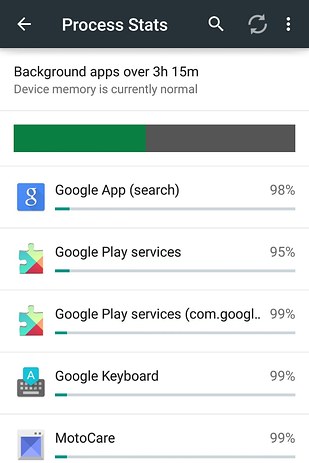
Now Go to Settings > Developer Options > Process Stats. There, you’ll find a ranking of which apps are using the most memory (RAM). If your phone is being *super* s-l-o-w, quit the top shown here.
HOW TO EXTEND YOUR BATTERY LIFE

HOW TO EXTEND YOUR BATTERY LIFE


First, turn off Bluetooth, GPS (Settings > Location > switch to off *or* tap Mode >Battery saving), and sync for apps (Settings > Under “Accounts” select which apps to stop syncing (Google, Facebook, and chat apps are probably big culprits)). This will cut most of the battery drainage.
You can also see all apps that are currently running by going to Settings and tapping the Running section (for Moto X), then closing those apps.
Next, go to Settings > Battery to see which apps are using most. It’ll probably be your screen or any app that requires GPS. Tap the app to “force stop.”
If you’re really desperate, turn your brightness all the way down and turn off keyboard sound and vibration (Settings > Language & input > settings icon next to “Google Keyboard” > Preferences > unselect “Sound on keypress”).

HOW TO SET YOUR PHONE TO UNLOCK AUTOMATICALLY WHEN YOU ARE AT HOME

HOW TO SET YOUR PHONE TO UNLOCK AUTOMATICALLY WHEN YOU ARE AT HOME


gurustechs
 
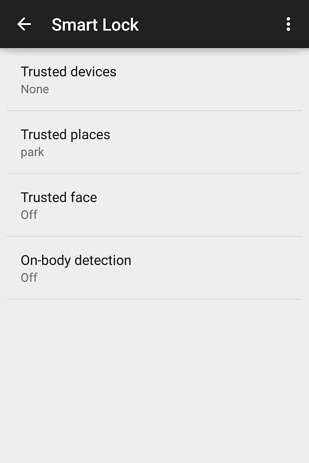
“Smart unlock” is a new feature in Android 5.0 Lollipop. It removes your phone’s PIN or password in certain locations you trust, like home or work. 
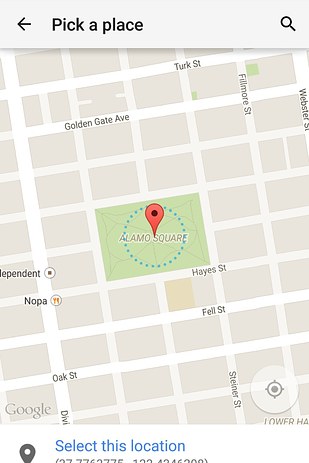
al you need to do is :Go to Settings >Security > Smart Lock > Trusted places and add to trusted places.
If your device is running Android 4.4 KitKat, there is a smart workaround for this. Enable installation from third-party apps by going to Settings > Security > selectingUnknown sources. Then follow these instructions.
SECRET GAME IN ANDROID PHONES [HOW TO LOCATE IT]

SECRET GAME IN ANDROID PHONES [HOW TO LOCATE IT]

Every android device comes with game but not everyone knows, however Lollipop and Marshmallow’s game is based on Flappy Bird  it has the same gameplay principle but has had an Android-themed makeover graphics-wise.


android-game
Go to Settings > About phone and tap device’s version  several times. Eventually you’ll be presented with an on-screen lollipop or marshmallow depending on your operating system. Tap and hold the center for 30seconds or Continue to rapidly tap it center and the game will launch.

COMMENT BELOW FOR ANY EQUERRY 
EASY WAY TO DOWNLOAD ANY YOUTUBE VIDEO WITHOUT VIDEO DOWNLOADER

EASY WAY TO DOWNLOAD ANY YOUTUBE VIDEO WITHOUT VIDEO DOWNLOADER

Hello everyone , today am gonna show you how to download ay youtube video without video downloader
STEP1.
Go to youtube.com and search for the video you want to download
STEP2.
Click on the video you want to download [assuming I want to download this]
STEP3.
Now click on the link bar and delete link from [ http://m. for PC http://www.]


STEP4.
Add SS to the link with small letters and click Go

STEP5.
It will redirect you to a page call saveform where you select the video quality you want

STEP6.
 Now select the video quality you want and click download

I HOPE THIS TUTORIAL IS HELPFUL PLS LEAVE A COMMENT BELLOW


Friday, 10 March 2017

INTERNET DOWNLOADING MANAGER [IDM] 2017 100% WORKING FREE SERIAL NUMBERS

INTERNET DOWNLOADING MANAGER [IDM] 2017 100% WORKING FREE SERIAL NUMBERS

WHAT IS IDM SERIAL NUMBER?

Internet Download Manager (IDM) is one of the best apps for PC which has been used to download videos, songs, applications, games, documents etc. IDM supports you fast speed, so you will not lose much time to wait. To use IDM, you need to have IDM serial key generator. So in  this tutorial we will give serial number IDM 6.23, IDM 6.25 serial key,  serial number IDM 6.27, serial number IDM 2017 free.
You can download IDM free latest version clicking here.

IDM SERIAL NUMBER 2017 FREE

DBNJC-D4R59-YPAGA-T3S1Q
XONF7-PMUOL-HU7P4-D1QQX
N0Z90-KJTTW-7TZO4-I27A1
F9TZ9-P6IGF-SME74-2WP21
CJA0S-K6CO4-R4NPJ-EKNRK
629U7-XLT5H-6SCGJ-2CENZ
L67GT-CE6TR-DFT1D-XWVCM

SERIAL NUMBER IDM 6.23 FREE

XONF7-PMUOL-HU7P4-D1QQX
F9TZ9-P6IGF-SME74-2WP21
CJA0S-K6CO4-R4NPJ-EKNRK
N0Z90-KJTTW-7TZO4-I27A1

SERIAL NUMBER IDM 6.25 FREE

N0Z90-KJTTW-7TZO4-I27A1
629U7-XLT5H-6SCGJ-2CENZ
L67GT-CE6TR-DFT1D-XWVCM

SERIAL NUMBER IDM 6.27 FREE

629U7-XLT5H-6SCGJ-2CENZ

HOW TO USE SERIAL NUMBER IDM FREE

You can follow the steps below for learning how to use IDM serial number key for registration.
  • Step 1. Firt of all, you make sure that you turned off internet connection.
  • Step 2. Then you launch IDM on your PC.
  • Step 3. Under tab Registration, you click Registration.
  • Step 4. Now you enter your name, serial number IDM and email. Copy and paste any one row of IDM keygen is given above.
  • Step 5. Click OK to finished and restart your computer. All done!


Type your name, serial number IDM and email
Tip: Turn Off Your Internet Connection and apply anyone these IDM serial number keys to work properly.
If you have any problems, just comment below, and I will guide you step by step. Thanks for reading the way to activate IDM free download full version with serial number. We’ll add more working IDM serial number for registration free on this websit

Popular Post